Privileges accumulate. Attack surface compounds.
Permafrost scores every identity across Azure and Microsoft 365 — users, service principals, managed identities, and AI agents — against the permissions they actually exercise. The gap between granted and used is the attack surface. Read-only OAuth. Zero standing write access to your tenants.
One CIEM across Azure and Microsoft 365.
Permafrost analyzes role assignments across every Microsoft Cloud control surface, not Azure RBAC alone. Each plane produces findings you can act on.
Azure RBAC
Control-plane role assignments at every scope. The UPRS surface.
Entra directory roles
Directory-plane admin roles, PIM-aware.
Exchange
Mailbox and transport admin roles.
Intune
Device and endpoint management roles.
SharePoint
Site and content administration scopes.
Teams
Collaboration and meeting admin roles.
Defender
Unified security RBAC permission matrix.
Purview
Compliance and data-governance roles.
Power Platform
Environment and maker admin scopes.
Power BI
Workspace and capacity admin roles.
Viva Engage
Community and network admin scopes.
Azure DevOps
Organization and project-level access.
One score, one evidence type. UPRS scores Azure RBAC only, against ARM activity-log evidence. The Microsoft 365 and Entra planes above produce their own findings. Permafrost keeps the signals separate so every finding stays auditable.
Every non-human identity, including AI agents.
Service principals, managed identities, and the agent-identity class now appearing in modern Entra tenants. Permafrost classifies each by origin so analysts act on the right ones first.
AI agent blueprints
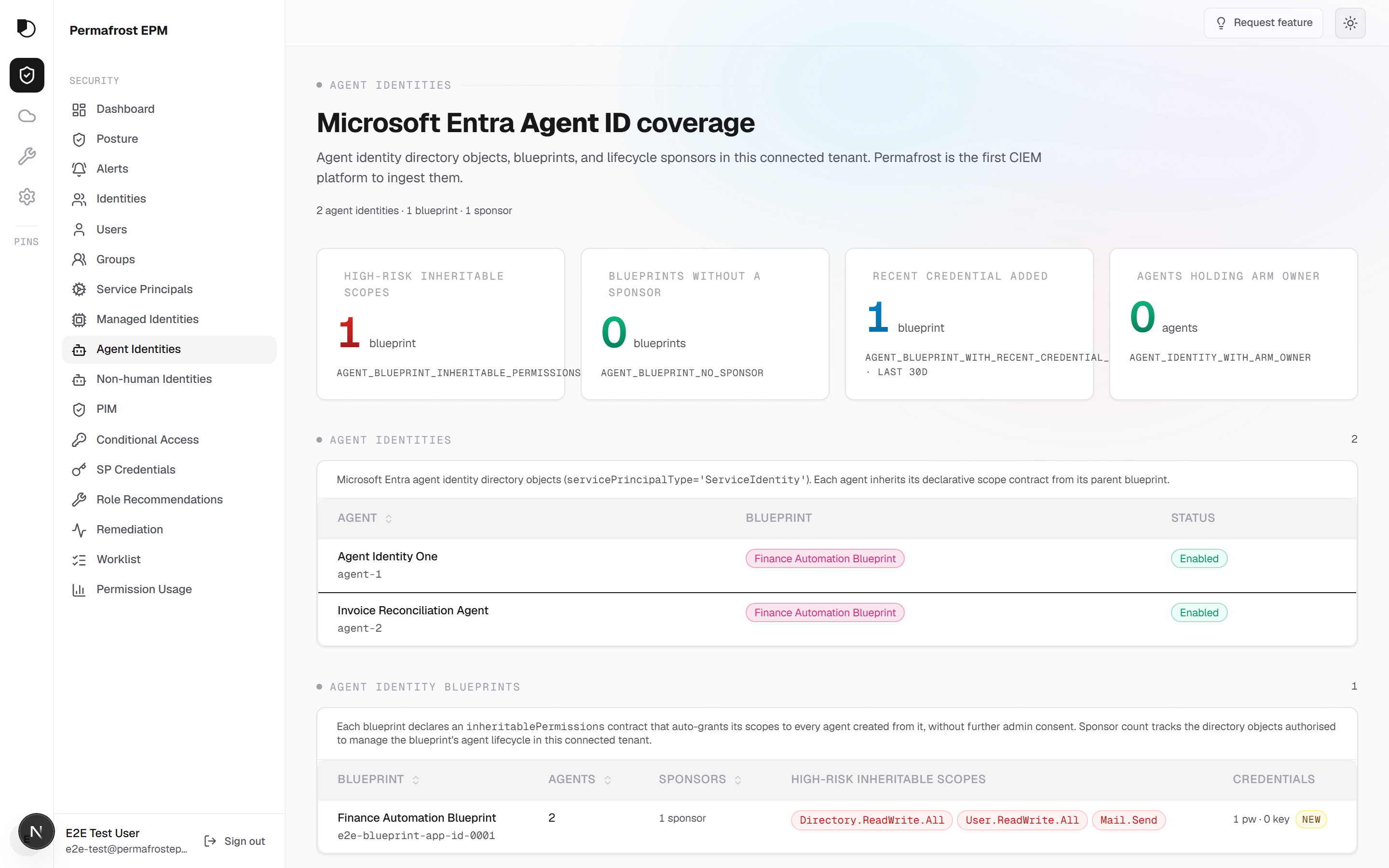
Entra Agent ID principals discovered by blueprint. Govern the parent blueprint, set tier-aware policy, see inherited permissions per agent.
Service-principal credential hygiene
Expiring and stale secrets, orphaned app registrations, and over-privileged consent grants surfaced on the inventory row.
Managed-identity inventory
System- and user-assigned identities traced back to the bound Azure resource. Decommission the resource, the identity follows.
Orphaned and no-sponsor findings
Tenant-registered SPs with no current owner and legacy principals with live credentials, ranked by blast radius.
Permission posture.
CIEM and SIEM are adjacent disciplines. They are not the same job.
| SIEM | CIEM | |
|---|---|---|
| Measures | Security events over time | The gap between permissions assigned and used |
| Optimizes for | Detection breadth | Permission-gap reduction |
| Surfaces | "What happened" | "What could happen if abused" |
| Sources | Logs, alerts, telemetry | Role assignments, directory state, activity logs as evidence |
Both are necessary. They are not the same job. Permafrost is the second one.
Three ways to act. No vendor write access to your tenants.
Every recommendation ships in three modes. The finding is the same. You pick the path that matches your change-control posture.
Mode A
Manual playbook
Permafrost writes the analyst walkthrough in Markdown. You run it.
- Steps authored against the specific finding, not a template
- Executed in Azure Portal or whatever tooling you already use
- Audit trail goes through your change-management process
Best for: Teams with strict change-control gates.
Mode B
Download script
Permafrost writes a PowerShell or Az CLI script. Every command is shown before you download.
- Full preview, no hidden side effects
- Runs in your own session, with your own credentials
- Ships as an auditable, signed script artifact
Best for: DevSecOps teams who want signed, reviewable artifacts.
Mode C
In-product action
Authorize a session-scoped OAuth grant. The action runs against your tenant from your browser.
Mode C is in active security review; available for evaluation under a co-pilot agreement.
- Token lives in memory only — never persisted, never logged
- Expires in one hour or less; discarded when the session ends
- Built for live incident response, where the next ten minutes matter
Best for: Live IR, once Mode C reaches GA.
Zero standing write access
Permafrost holds no write-capable token to any of your tenants. Mode C OAuth tokens are session-scoped, in-memory only, expire in ≤1 hour, and are discarded when the session ends. All three modes. No vendor write access to your tenant. Ever.
What Permafrost covers
Discovery through remediation. Every step of closing the permission posture gap in your connected Azure tenants.
Entitlement Discovery
Every user, group, service principal, managed identity, and AI agent in your connected Azure tenants. Ranked by blast radius. Linked to their role assignments.
Usage Gap Analysis
Assigned permissions, compared against the permissions an identity actually exercised. The unused half is what attackers find first.
UPRS — Unused Permission Risk Score
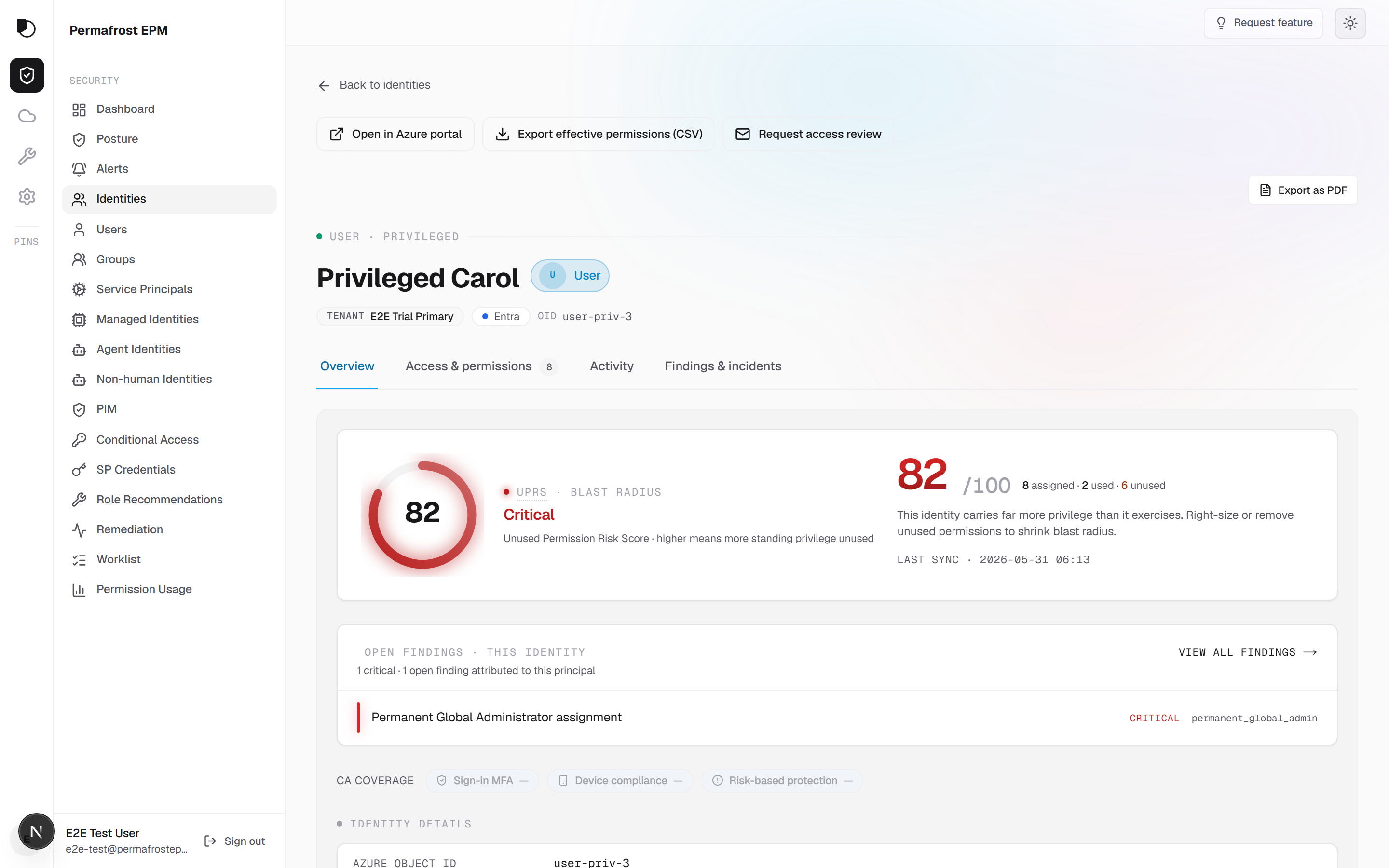
A 0–100 per-identity measure of Azure RBAC permissions granted versus exercised over a 90-day window. Evidence behind every score. RBAC-only by design.
Right-Sized Roles
Least-privilege custom roles generated from observed usage. Export as ARM, Bicep, or Terraform. Diff against current assignments before you ship.
Dormant Identities
Identities with active role assignments and no sign-in activity in 90 days, surfaced Tier-0 first. Ranked by blast radius, not alphabetically.
Toxic Combination Detection
Permission pairs that, together, enable privilege escalation paths an analyst would not spot from a role name alone.
Multi-Tenant
Connect every Azure tenant your organization owns. Each tenant is analyzed in isolation. We never aggregate data across separate customer organizations.
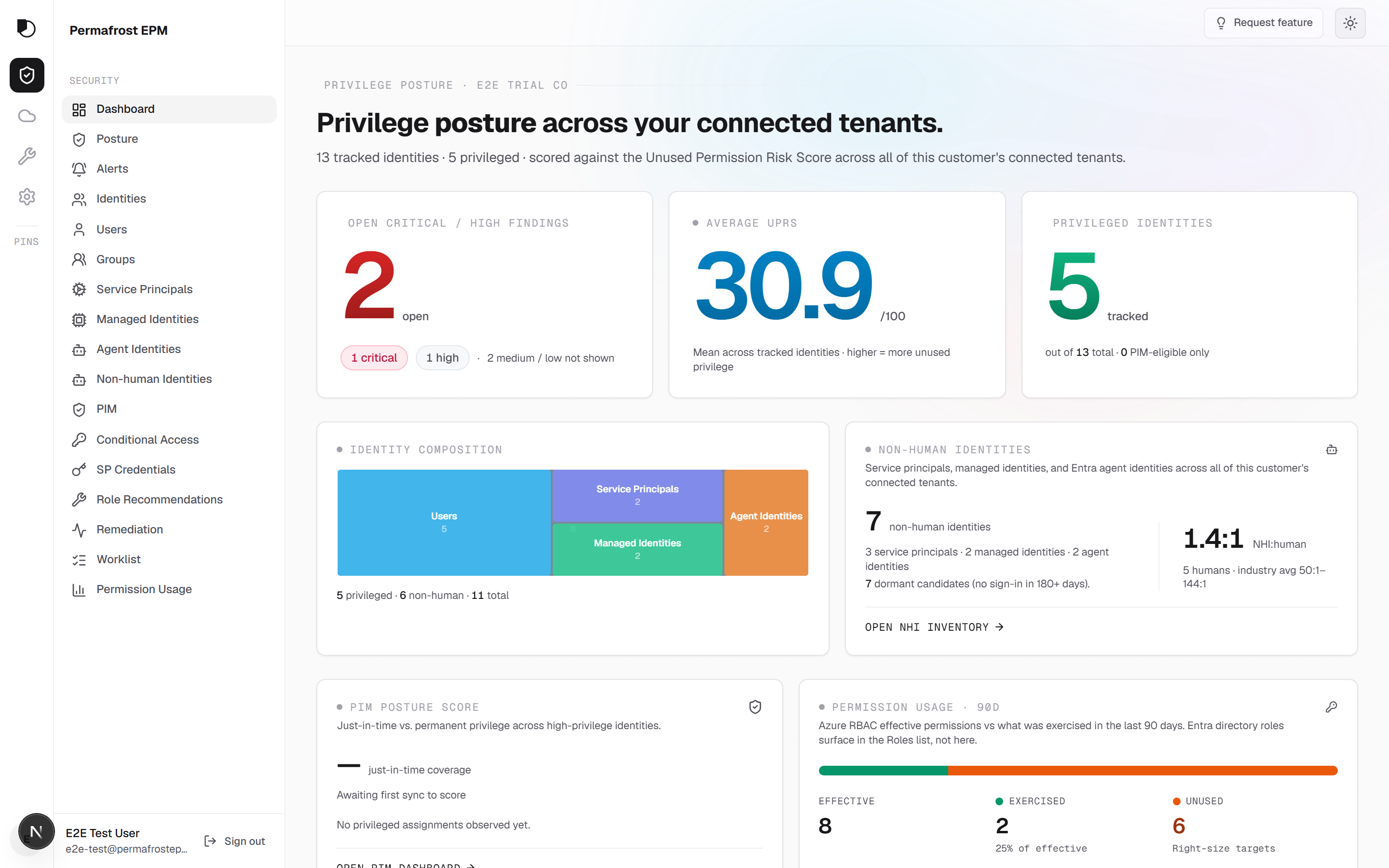
See the gap, with the evidence behind it.
Coverage at a glance, per-identity UPRS with the activity-log evidence, and agent governance by blueprint.
Findings mapped to the frameworks your auditors ask about.
Permafrost maps every finding to SOC 2, ISO 27001, CIS, and NIST 800-53 control references, so an access-review finding lands in the language your audit program already speaks.
- SOC 2
- ISO 27001
- CIS
- NIST 800-53
Control mapping is a product capability. It maps your findings to framework controls. It is not a Permafrost certification.
How Permafrost itself operates
- Read-only OAuth
- Zero standing write access
- No credential storage
- Data isolated per customer
Eight-minute consent. First findings the same day.
Grant read-only OAuth
A Global Admin completes the consent flow. Permafrost requests Reader-equivalent scopes and nothing else. You can revoke from the Entra admin portal at any time.
Full inventory, correlated
Every identity, role assignment, and scope. Correlated against 90 days of ARM activity logs to surface the gap between what was granted and what was used.
See the gap, generate the fix
Per-identity UPRS the same day. Right-sized custom roles you can export as ARM, Bicep, or Terraform. Diff against current assignments before you ship anything.
Pricing that scales with your tenant, not your headcount
Community Edition is free forever for privileged-identity coverage. Professional Edition unlocks every identity and every surface — start with a 90-day free trial, no credit card required.
Community Edition
FreePrivileged-only insight, free forever.
- Dashboard, Identities, Findings, Roles, PIM
- Privileged identities only
- Daily sync
- Connect any number of tenants
- No credit card required
- Community email support
Professional Edition
Full coverageFull coverage for serious least-privilege.
Pricing details coming soon. Start with a 90-day free trial — no commitment during the trial period.
- All surfaces, all data
- Hourly sync
- API access
- Custom role export (ARM / Bicep / Terraform)
- Full reports (PDF, CSV)
- Priority email support
- 90-day free trial included
One-time per customer. After 90 days, your account reverts to Community Edition unless you subscribe.
How are principals counted?
Principals are users, service principals, managed identities, agent identities, and groups that have role assignments in your connected tenants.
What does Community Edition include?
Community Edition covers privileged identities only — users and service principals with direct or inherited privileged role assignments. Dashboard, Findings, Roles, and PIM surfaces are all included, free forever.
What does Professional Edition include?
Professional Edition unlocks every identity type across all workload surfaces — Intune, Exchange, Purview, Defender, SharePoint, Teams, and more. Hourly sync, API access, full reports, and priority support included.
Can I extend my trial?
Yes — reach out from the in-app Settings page and we’ll review case-by-case.
Start a free trial. Read-only consent. No credit card.
90 days. Full coverage. Every identity in your connected tenants. Community Edition keeps privileged-identity coverage free, forever.